JJ Bot
A team of AI agents that work on your computer, on the models you choose.
Download
Windows may say it protected your PC, because the installer isn't code-signed yet: click More info → Run anyway. It downloads and installs the newest JJ Bot (and Python, if the PC has none), with no admin rights needed.
JJBot-Setup.exe · 185 KB · SHA-256 e32c3dc351443e3c09bbcb5eb5f78e7e50cfde2c3d01445736f546f624ce1b6a
Or install it with one command. Run it again any time to update.
Mac or Linux, in Terminal:
curl -fsSL https://www.jmtechpower.com/jjbot/install.sh | bash
Windows, in PowerShell:
irm https://www.jmtechpower.com/jjbot/install.ps1 | iex
JJ Bot in one minute
Recorded in the real app. To keep it short, the bots' answers come from a scripted demo model; with your own model they'd be its answers.
Bots on Claude Code, an API key or a local model ask before commands and file changes. Codex, Gemini CLI, Grok Build, Qwen Code and CodeBuddy can't ask, and may do some of these without asking.
New highlights (November 2026)
A lead bot that knows you everywhere
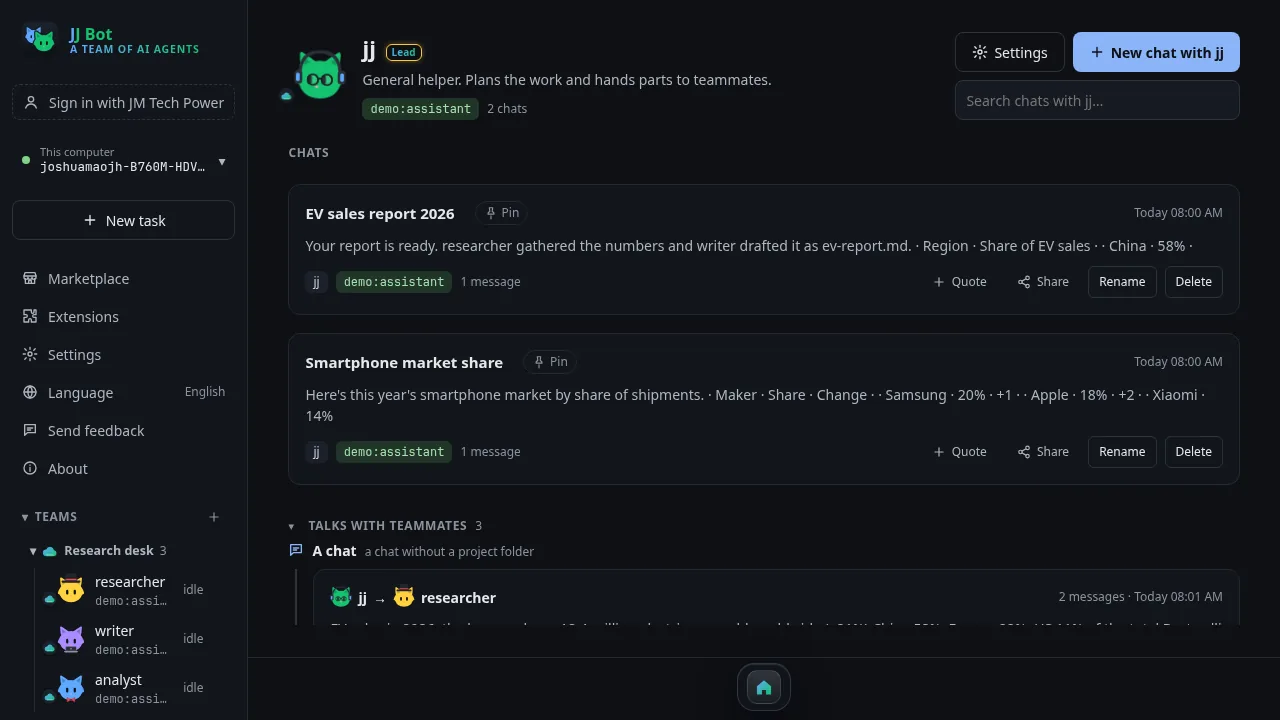
jj leads your bots; the others report to it when they finish a task for you. Signed in, its memory of you and those reports follow your account to every computer, so it picks up where you left off. Lines that look like a key or password never leave the computer.
All your computers, as one
Computers on your account find each other. Open one here or in its own window, or type @com:Name to hand a task to that computer's bots. Each bot and team shows whether it syncs with your account or stays on this computer.
Multitask like a desktop
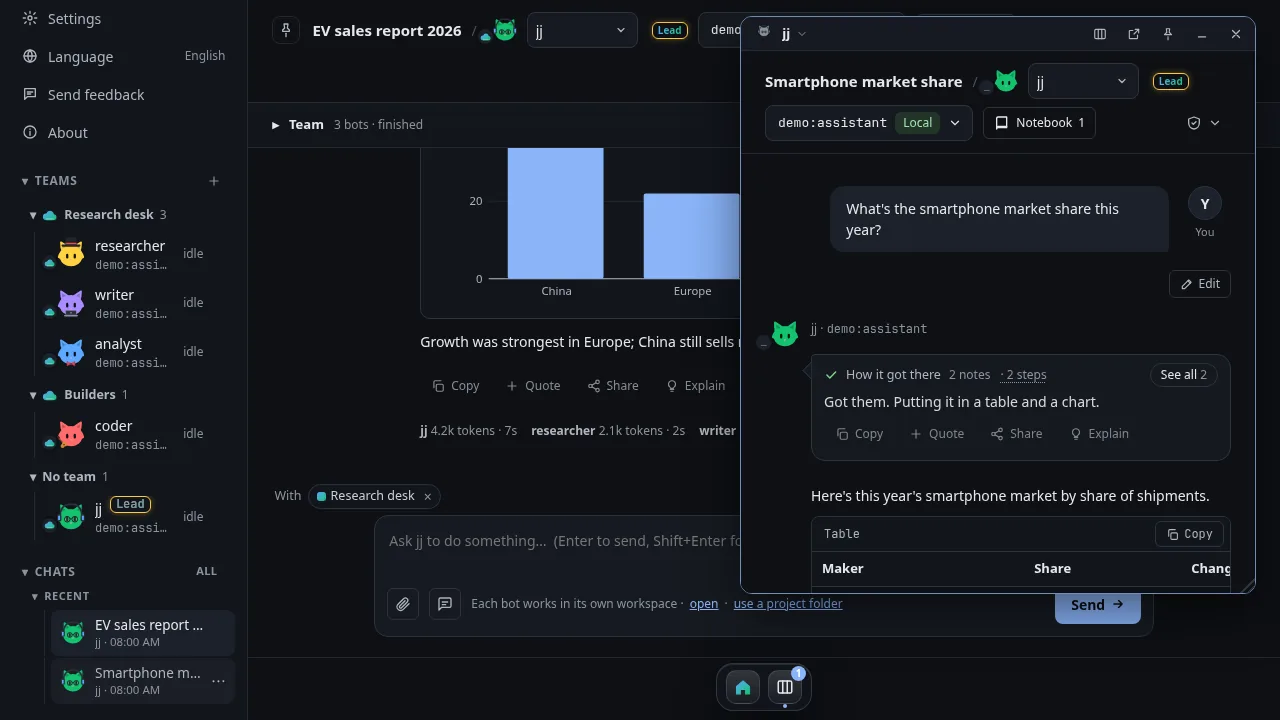
Chats as windows: drag, resize, pin, side by side, minimize to the dock, or pull one out onto your desktop. The dock has Home and your tools.
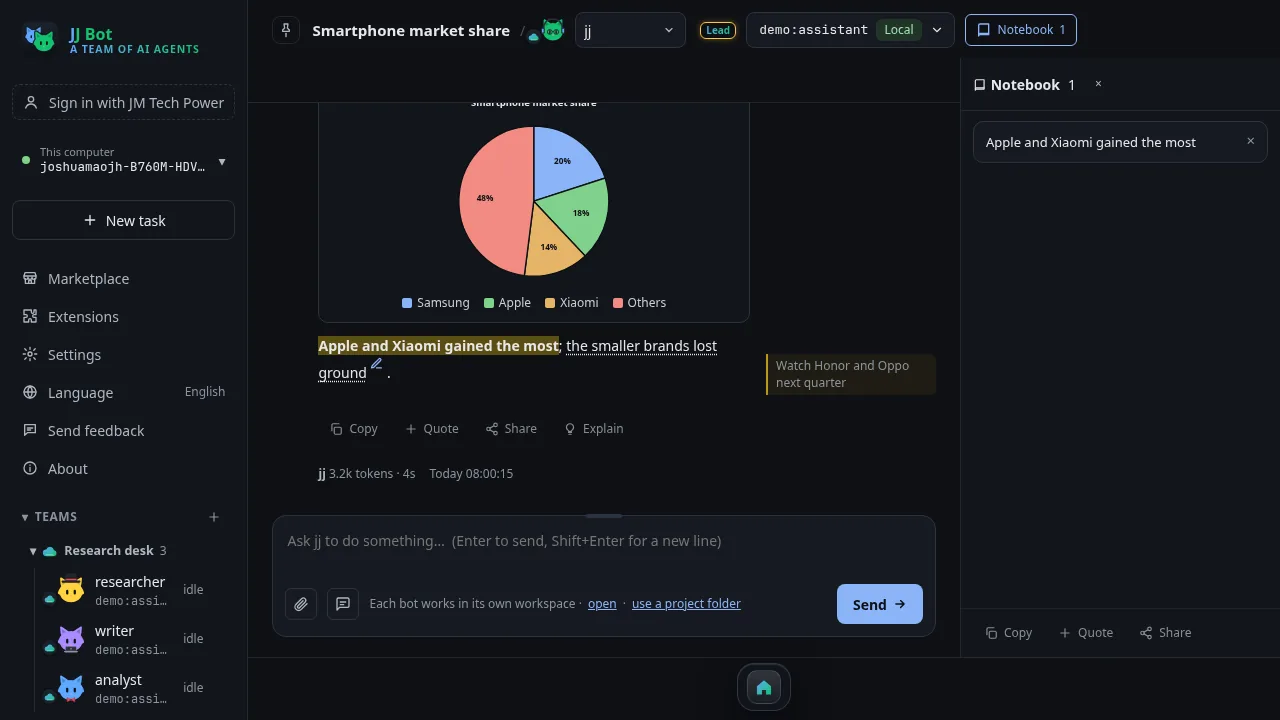
Mark up any answer
Bold, colours, highlights, boxes; notes beside the words; a notebook of clippings; share with your marks or without.
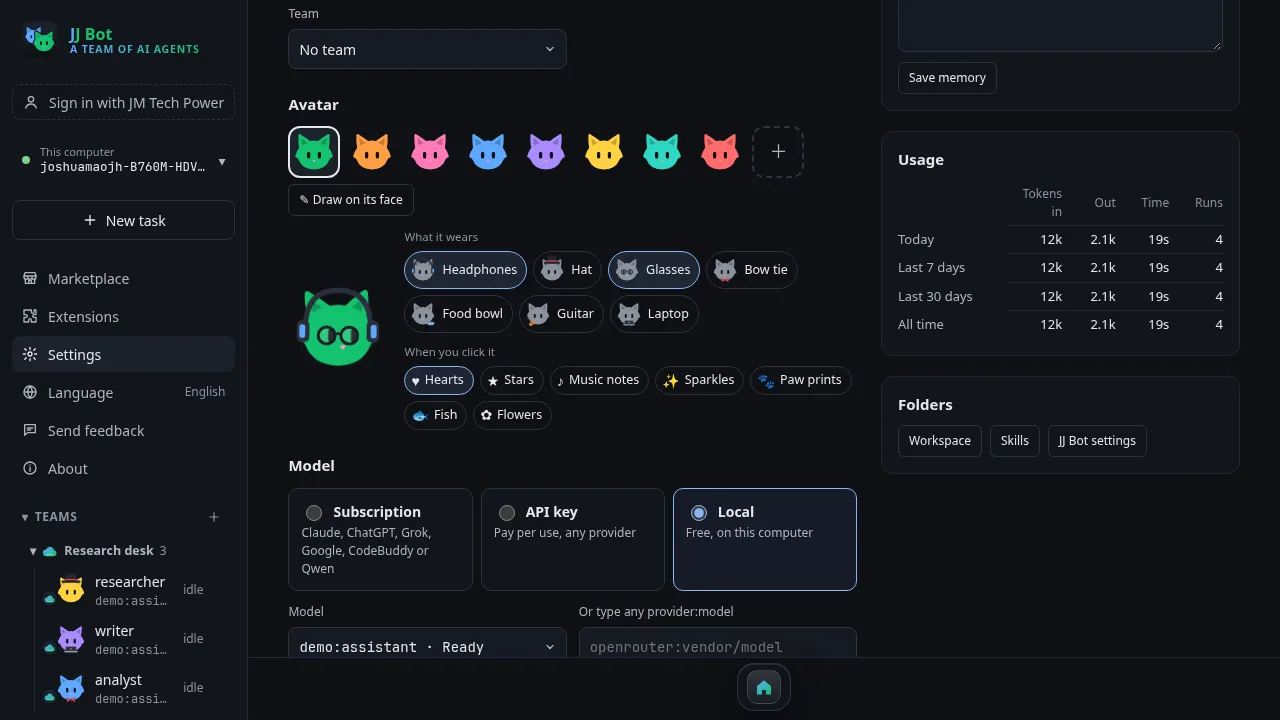
Cats with character
Dress the cats up (headphones, hats, glasses, guitar…), pick what pops out when you click, draw on their faces. A new chat's cat greets you and brings up what it remembers about you.
Share and quote anything
An answer, a selection or a whole chat, to X, WhatsApp, Telegram, WeChat or email, or saved as Markdown, a web page or a PDF. Or Share → Publish on jmtechpower.com: edit the title, category, tags and text right in JJ Bot, then publish it as an article with one click, or save it as a draft. Files your bots made on your computer go on your JM Drive first, so their links open for everyone (JM Drive is free with a JM Tech Power account).
Safe from anywhere
Settings → Security lists every device that used this computer and which chats; other devices can't change keys, tools or approvals unless you allow it. Clean uninstall from Windows' Installed apps.
More models, a free start
Coding Plans (GLM, Kimi, Bailian, Volcano Ark, Xiaomi MiMo), and Start free with a free Zhipu key on GLM-4.7-Flash.
Dark or light
Settings → Devices → Theme: JJ Bot in dark (as it always was), in light, or following this computer's own setting as it changes through the day.
Use your other computer's local models
A computer on your account with Ollama models shares them: they show on your other computers under On your other computers. Pick one, and it runs on that computer's CPU or GPU while the bot works here. Settings → Devices turns sharing off.
News beside your chat
Install News (Marketplace → Tools) and open it from the dock: Google News's top stories, sections and search in your language, on the chat's left, with the notebook on the right. Ask about a story and the bot takes it from there.
Flash Download, inside JJ Bot
Install it (Marketplace → Tools) for a Downloads page: files come down over up to 32 connections, keep going after a restart and are checked at the end. Your bots can download too, and carry on with the files when they arrive.
Your own news sites
Add your favourite news sites to News: each gets a tab beside Google News, its stories open in the reader, and Ask hands them to your bot. Extensions → News renames, reorders and removes them.
Five new official skills
Installed by themselves: office documents (Word, Excel, PowerPoint and PDF, formatting kept and the result checked), answering from your files (each fact with its file and page), checking spreadsheets (duplicates, totals, formulas, every difference listed), designing routines (timing, missed runs, no data) and second-opinion review (another bot checks a draft's sources and numbers).
Feishu / Lark connector
Connect a Feishu or Lark app you make (its App ID and App Secret) in Settings → Connections or the Marketplace, and bots work with its docs, sheets, bases, chats and calendars, through Feishu's own MCP server.
Reads Office files and PDFs
Bots read PDF, Word, Excel and PowerPoint files straight away: reading one gives them its text, with nothing to install.
Set up in two minutes, free
New here with no model yet? The first chat walks you through it: sign up for Zhipu's free GLM-4.7-Flash, paste the key, and JJ Bot only says it's ready once the model really answers. If a model ever stops answering, it says why in plain words (wrong key, out of credit, busy, no connection) and what to do.
JM Chat, inside JJ Bot
Install JM Chat (Marketplace → Tools) and open it from the dock: the members' chat in a window inside JJ Bot, like Multitask (drag it, put it beside your chats, minimize it), already signed in with your JJ Bot account.
Skills from GitHub
Marketplace → Skills → From a GitHub repository: paste a repository like anthropics/skills or vercel-labs/agent-skills (or a folder in one) and pick the skills you want. They join your skills, scripts and all, and Update keeps them current without touching ones you changed.
Thousands of prompts from prompts.chat
Marketplace → Prompts now also searches prompts.chat, the best-known open prompt collection (public domain). Filter by kind, read a prompt, then add it to your prompts or put it straight in the message box.
Each person their own JJ Bot
Share a computer? Every JM Tech Power account signed in on it keeps its own bots, chats, memory, keys and settings, and never sees another account's. Signing in as someone else, or signing out, restarts JJ Bot on that person's things, and jmtechpower.com asks for a fresh sign-in each time instead of reusing the last person's. On your own computer nothing changes.
MCP servers from the MCP Registry
Marketplace → Connectors → Search the MCP Registry: thousands of MCP servers published by their makers on the official MCP Registry. Each shows who made it, its source, and whether it's an online service or runs on your computer. Type a key if it needs one; JJ Bot connects to check it works first, and its tools ask first unless you allow otherwise, except on CodeBuddy, which can't ask. JJ Bot hasn't tested these servers, so check who makes one before adding it. (Docker images and .mcpb bundles aren't supported yet.)
Work kits: one button, ready to work
Marketplace → Work kits: skills, tools and connectors put together for one job. Press Set up and check: JJ Bot adds what's missing, opens any sign-in you need, tests each part, then gives you an example first task. The first two kits: files to JM Drive, and research with current code docs.
Learn JJ Bot
create or recruit bots and teams
Part 2install from the Marketplace
Part 3JJ Bot across your devices
Part 4a bot's special skills in a chat
See it in action
What it does
Any model
Claude, GPT, Grok, DeepSeek, Kimi, GLM, Qwen, OpenRouter, or free local models with Ollama. Pick a different one for each bot.
Your subscriptions
Already pay for Claude Pro, ChatGPT Plus, SuperGrok, a Google account or CodeBuddy / WorkBuddy? Bots can run on those instead of API keys.
Bots that work together
Bots hand work to each other, share a project folder, and can make new bots. A live board shows who's doing what.
You stay in charge
With Ask on, bots on Claude Code, API keys or local models wait for your OK before commands and file changes, apart from what you've allowed and notes to their own memory. Codex, Gemini CLI, Grok Build, Qwen Code and CodeBuddy can't stop to ask: each chat's shield says what they do instead.
From your phone
Chat and approve from your phone, with an alert when a bot needs you. Pair several computers and switch between them from the app or your phone.
Work around the clock
Routines run on a schedule, like a morning news summary, and keep a log you can read later.
Connectors
Plug in GitHub, Notion, Feishu / Lark, Stripe, Supabase, Airtable, Brave Search, a real browser or a folder of files. Paste a key and bots on Claude Code, Codex, Grok Build, CodeBuddy or an API model can use it.
Mac, Windows & Linux
One command installs it, and running it again updates it. JJ Bot then opens from your apps like any other.
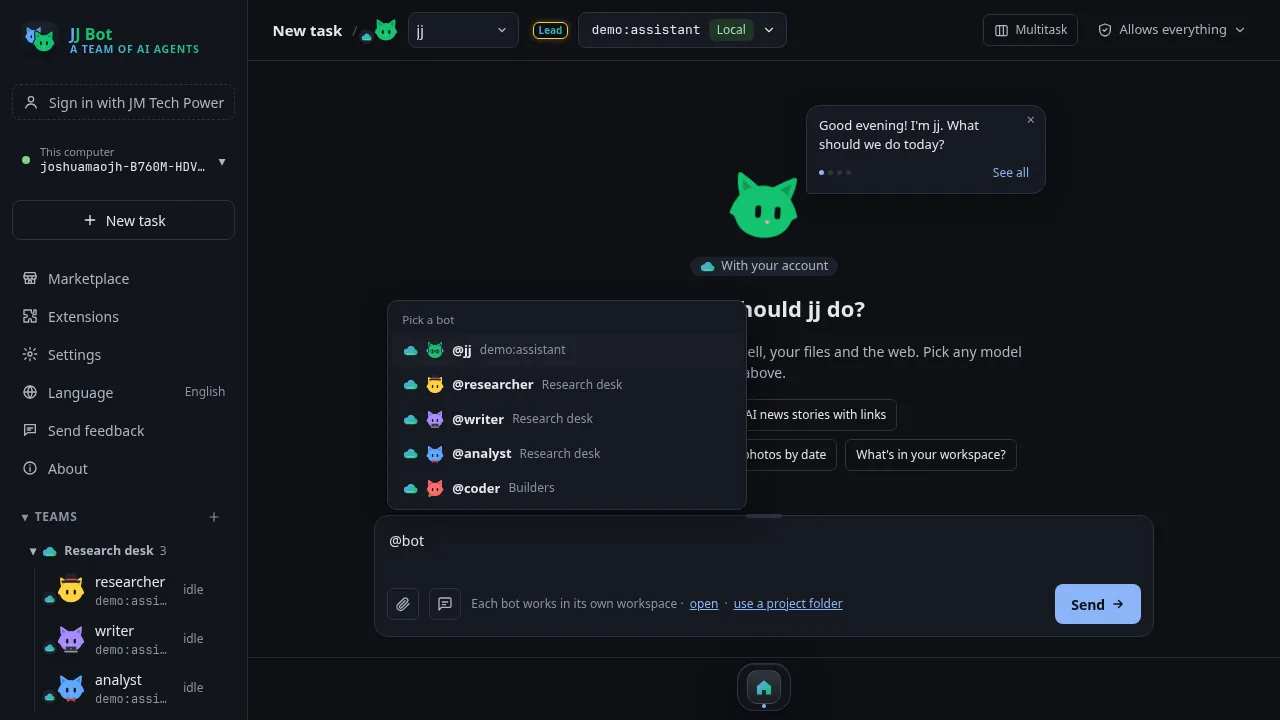
@ a team or a bot
Type @ in a message to hand parts of a task to a team, one bot or several. They work at the same time and send their answers back.
Files right in the chat
When a bot makes a web page, picture, table or document, it shows in the answer. Pages run in a preview box you can click through.
Templates & Marketplace
Start from ready-made bots and teams, save your own, and share them or add ones other people made. JJ Bot's official skills come installed, and you can share your own skills, add skills from GitHub, and search thousands of open prompts from prompts.chat.
Your setup everywhere
Sign in with your JM Tech Power account and your bots, teams, prompts and skills sync to every computer. Keys and chats stay put.
8 languages
English, 简体中文, 繁體中文, Deutsch, Français, 日本語, 한국어 and हिन्दी.
How JJ Bot compares
Grok Bot, OpenAI Dots and Meta Muse are always-on agents that run on a computer in their maker's cloud. JJ Bot takes a different path: it runs on your own computer, with whichever models you choose.
| JJ Bot | Grok Bot (xAI) | OpenAI Dots | Meta Muse | |
|---|---|---|---|---|
| Models | Any. Claude, GPT, Grok, Gemini, DeepSeek, Kimi, Qwen, GLM, or free local models. A different one for each bot. | xAI's Grok models only | OpenAI's models only | Meta's models only |
| Where it runs | On your own Mac, Windows or Linux computer | A cloud computer from xAI | A cloud computer from OpenAI | A private cloud computer (Secure VM) from Meta |
| Your files and logins | Stay on your computer. Only what a bot sends to its model leaves it. | Kept on xAI's computer | Kept on OpenAI's computer | Kept on Meta's computer; real passwords hidden from the agent |
| Cost | Free app. Use subscriptions you already pay for, pay-per-use keys, or free local models. | Needs a paid xAI plan | ChatGPT Pro or Business plans | Meta account; launched in a few countries first |
| Several bots working together | Yes. Any bot can message any other, even when they run on different companies' models. Sort them into teams. | Several Bots per account | A Dot can hand work to helper agents | One personal agent |
| Asks before risky steps | On Claude Code, API keys and local models. Other AI tools can't all ask. Per bot: ask, allow everything, or read only. | Hands over to you for passwords, payments and similar steps | Configurable permissions and an automatic review of big actions | A second agent checks every outside action |
| Works in mainland China | Yes, with DeepSeek, Kimi, Qwen, GLM, CodeBuddy or local models | Not offered there | Not offered there | Not offered there |
| Keeps working when your computer is off | No. It needs your computer on (it keeps running in the background while the window is closed) | Yes | Yes | Yes |
| Setting it up | More steps. Install the app, then add a key, sign in to a subscription tool, or download a local model | Nothing to install | Built into ChatGPT | In Meta's apps, plus a Mac app |
Where JJ Bot is strongest
- Free, and not tied to one AI company: mix models, and switch any time
- Your files stay on your own computer
- Teams of bots that work together, across different models
- Works in mainland China, and offline with local models
Where it falls short
- Stops when your computer is off or asleep; there's no cloud computer
- Takes a few more steps to set up than a website
- How good a bot is depends on the model you pick; small local models are weaker
- A young project from a small team
Based on what each company and the press reported as of November 2026; their plans and countries change often. Sources: Grok Bot, OpenAI Dots, Meta Muse.
What you need
- A Mac, a Windows 10 or 11 PC, or a Linux computer, with Python 3.11 or newer. The installer finds it wherever it is, including Homebrew, the Windows
pylauncher and uv. - No Python yet? On Windows, the installer and the one-command install add Python 3.12 for you. On a Mac:
brew install python@3.12, or get it from python.org. - On Linux, the desktop window also needs GTK WebKit. On Ubuntu or Debian:
sudo apt install python3-venv python3-gi gir1.2-webkit2-4.1 - A model to use. JJ Bot's first chat walks you through Zhipu's free GLM-4.7-Flash, or use an API key, a subscription you already have, or Ollama for free local models.
Install by hand
- Download
jjbot.zipabove and unzip it. - In the
jjbotfolder, runbash install-desktop.sh(on Windows:powershell -ExecutionPolicy Bypass -File install-windows.ps1). JJ Bot appears in your apps: Applications on a Mac, the Start menu on Windows, the app menu on Linux. - Open JJ Bot: its first chat helps you connect a model. (In a terminal,
jjbot initdoes the same; on a Mac or Linux,.venv/bin/jjbot init.)
Just want the command line? pip install -e . in the folder, then jjbot init.
After installing
- The first chat helps you connect a model;
jjbot initdoes the same in a terminal. Settings live in~/.jjbot. - Open JJ Bot from your apps (on a Mac: Launchpad or Spotlight; on Windows: the Start menu), or chat in a terminal with
jjbot chat. - The full guide is
README.mdinside the download.
Remove it
On a Mac:
rm -rf ~/.local/share/jjbot ~/.local/bin/jjbot ~/Applications/"JJ Bot.app"
On Linux:
rm -rf ~/.local/share/jjbot ~/.local/bin/jjbot ~/.local/share/applications/jjbot.desktop
On Windows, in PowerShell (if you turned on jjbot remote install, run jjbot remote uninstall first):
Remove-Item -Recurse -Force "$env:LOCALAPPDATA\JJBot", "$env:APPDATA\Microsoft\Windows\Start Menu\Programs\JJ Bot.lnk"
This keeps your settings and chats. To remove those too, also delete ~/.jjbot.