JJ Bot
A team of AI agents that work on your computer, on the models you choose.
Download
Windows 可能提示“已保护你的电脑”,因为安装程序还没有代码签名:点“更多信息”→“仍要运行”。 安装程序会下载并安装最新版 JJ Bot(没有 Python 时会先安装 Python),不需要管理员权限。
JJBot-Setup.exe · 185 KB · SHA-256 e32c3dc351443e3c09bbcb5eb5f78e7e50cfde2c3d01445736f546f624ce1b6a
或者用一条命令安装。随时再运行一次即可更新。
Mac 或 Linux,在“终端”里:
curl -fsSL https://www.jmtechpower.com/jjbot/install.sh | bash
Windows,在 PowerShell 里:
irm https://www.jmtechpower.com/jjbot/install.ps1 | iex
JJ Bot 一分钟速览
Recorded in the real app. To keep it short, the bots' answers come from a scripted demo model; with your own model they'd be its answers.
使用 Claude Code、API 密钥或本地模型的机器人会在运行命令和修改文件前询问。Codex、Gemini CLI、Grok Build、Qwen Code 和 CodeBuddy 无法询问,可能会不经询问就执行其中一些操作。
最新亮点(2026 年 11 月)
处处都认识你的主机器人
jj 统领你的机器人,其他机器人完成任务都向它汇报。登录后,它对你的记忆和汇报随账号同步到每台电脑,换台电脑也能接着做。像密钥或密码的内容绝不离开本机。
多台电脑,用起来像一台
同一账号的电脑自动互相发现;在本窗口或新窗口打开另一台,或输入 @com:名称 把任务交给那台电脑的机器人。每个机器人和团队都标明随账户同步还是只在本机。
像桌面一样多任务
对话开成窗口:拖动、缩放、置顶、并排、收进程序坞,或拖到电脑桌面上。程序坞里有 Home 和你的工具。
任意标注回答
加粗、上色、高亮、加框;批注写在文字旁;精华剪进笔记本;分享时可带或不带标注。
有个性的猫咪
给猫咪戴耳机、帽子、眼镜、吉他……;选择点击特效;在脸上画画。新对话里猫咪会打招呼并提起它记得的你。
分享与引用,随心所欲
回答、选中的文字或整段对话,发到 X、WhatsApp、Telegram、微信或邮件,或存为 Markdown、网页、PDF。还可以“分享 → 发布到 jmtechpower.com”:直接在 JJ Bot 里编辑标题、分类、标签和正文,一键发布为文章,或保存为草稿。机器人在你电脑上生成的文件会先上传到你的 JM Drive,链接人人都能打开(注册会员即免费获得 JM Drive)。
随处都安全
“设置 → 安全”列出用过本机的每个设备和对话;未经允许,其他设备不能改密钥、工具或审批方式。Windows 可从“安装的应用”干净卸载。
更多模型,免费起步
支持 GLM、Kimi、百炼、火山方舟、小米 MiMo 的 Coding Plan;“免费开始”用免费智谱密钥跑 GLM-4.7-Flash。
深色或浅色
“设置 → 设备 → 主题”:深色(一直以来的样子)、浅色,或跟随本机设置随时切换。
调用其他电脑上的本地模型
同一账号下装有 Ollama 模型的电脑会共享它们:在你的其他电脑上,它们出现在“在你的其他电脑上”。选中后,模型在那台电脑的 CPU 或 GPU 上运行,机器人照常在这台电脑上干活。可在“设置 → 设备”关闭共享。
边看新闻边聊
安装“新闻”(市场 → 工具),从程序坞打开:Google 新闻的头条、各版块和搜索,按你的语言显示在对话左侧,右侧还能开着笔记本。对某条新闻点“提问”,机器人接着帮你分析。
Flash Download 进驻 JJ Bot
安装后(市场 → 工具)多一个“下载”页面:文件最多 32 条连接同时下载,重启后接着下,完成后自动校验。机器人也能下载,文件到了就接着干活。
添加自己的新闻网站
在“新闻”里添加你常看的新闻网站:每个网站在 Google News 旁边都有自己的标签,新闻在阅读器中打开,点“提问”交给机器人。在“扩展 → 新闻”里重命名、排序和删除。
五个新的官方技能
自动安装:办公文档(Word、Excel、PowerPoint、PDF,保留格式并检查效果)、根据你的文件回答(每条信息注明出自哪个文件哪一页)、表格核对(重复、合计、公式,列出所有差异)、定时任务设计(时间、漏跑、缺数据时怎么办)和交叉复核(由另一个机器人核对初稿的来源与数字)。
飞书 / Lark 连接器
在“设置 → 连接”或市场里接入你创建的飞书或 Lark 应用(App ID 和 App Secret),机器人就能处理其中的文档、表格、多维表格、群聊和日历,使用飞书官方的 MCP 服务器。
直接读取 Office 文件和 PDF
机器人可以直接读取 PDF、Word、Excel 和 PowerPoint 文件:读取时得到文件中的文字,无需安装任何东西。
两分钟免费配好模型
刚装好还没有模型?第一次对话就会一步步带你配置:注册智谱免费的 GLM-4.7-Flash,粘贴密钥,等模型真的回复了,JJ Bot 才算配置成功。以后模型没反应时,也会用大白话说明原因(密钥不对、余额不足、太忙、连不上)和该怎么做。
JM Chat 进驻 JJ Bot
安装 JM Chat(市场 → 工具),从程序坞打开:会员聊天在 JJ Bot 内的窗口中打开,像多任务一样可以拖动、与对话并排、最小化,并已用你的 JJ Bot 账号自动登录。
从 GitHub 安装技能
市场 → 技能 → 来自 GitHub 仓库:粘贴 anthropics/skills、vercel-labs/agent-skills 这样的仓库地址(或其中某个文件夹),挑选想要的技能安装。它们连同脚本一起加入你的技能,点“更新”即可同步到最新,你改过的不会被覆盖。
数千条 prompts.chat 提示词
市场 → 提示词现在也会搜索 prompts.chat,这是最知名的开放提示词库(公有领域)。可按类型筛选,先阅读,再添加到我的提示词,或直接放入输入框。
每人一个自己的 JJ Bot
和别人共用一台电脑?每个在这台电脑上登录的 JM Tech Power 账号都有自己的机器人、对话、记忆、密钥和设置,互相看不到。换人登录或退出登录时,JJ Bot 会重新打开那个人自己的内容,jmtechpower.com 每次都会重新要求登录,不会沿用上一个人的账号。只有你自己用的电脑,一切照旧。
从 MCP Registry 添加 MCP 服务器
市场 → 连接器 → 搜索 MCP Registry:在官方 MCP Registry 中搜索数千个由开发者自己发布的 MCP 服务器。每个都标明发布者、源代码,以及是在线服务还是在本机运行。需要时填上密钥,JJ Bot 先连接测试成功才添加。除非你另行允许,否则工具使用前会先问你;但 CodeBuddy 无法询问。JJ Bot 没有测试过这些服务器,添加前请先看看是谁做的。(暂不支持 Docker 镜像和 .mcpb 包。)
工作套件:一键配置,装好就能用
市场 → 工作套件:把做好一件事所需的技能、工具和连接器组合在一起。点“一键安装并配置”,JJ Bot 会补齐缺少的部分,需要登录时打开授权窗口,逐项测试,再给你一个示例任务。首批两套:整理资料并归档到 JM Drive,以及用最新开发文档做研究。
JJ Bot 入门教程
实际效果
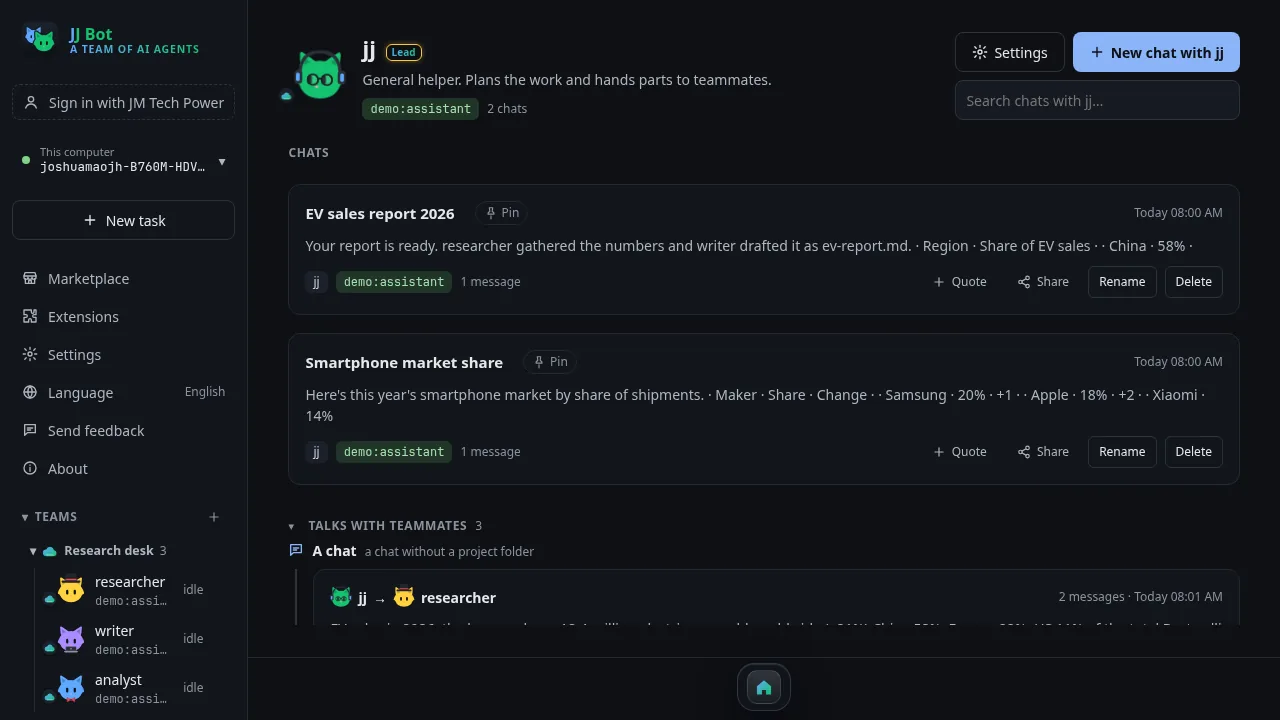
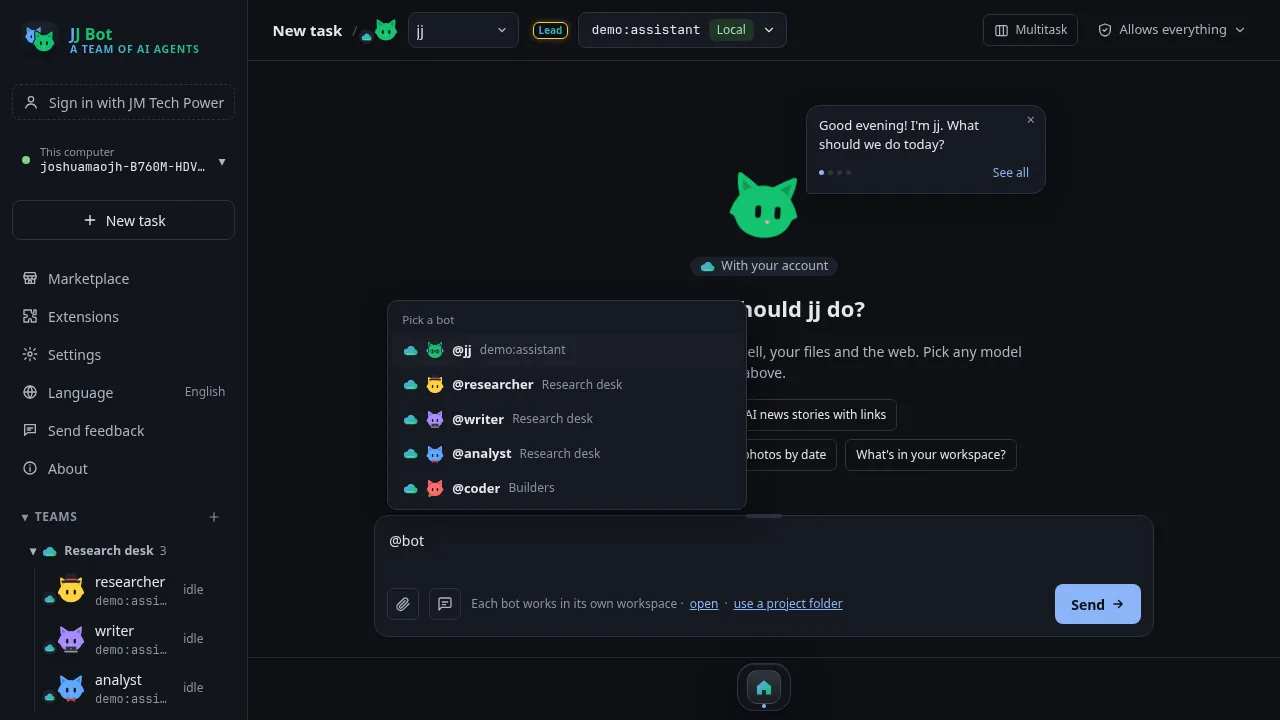
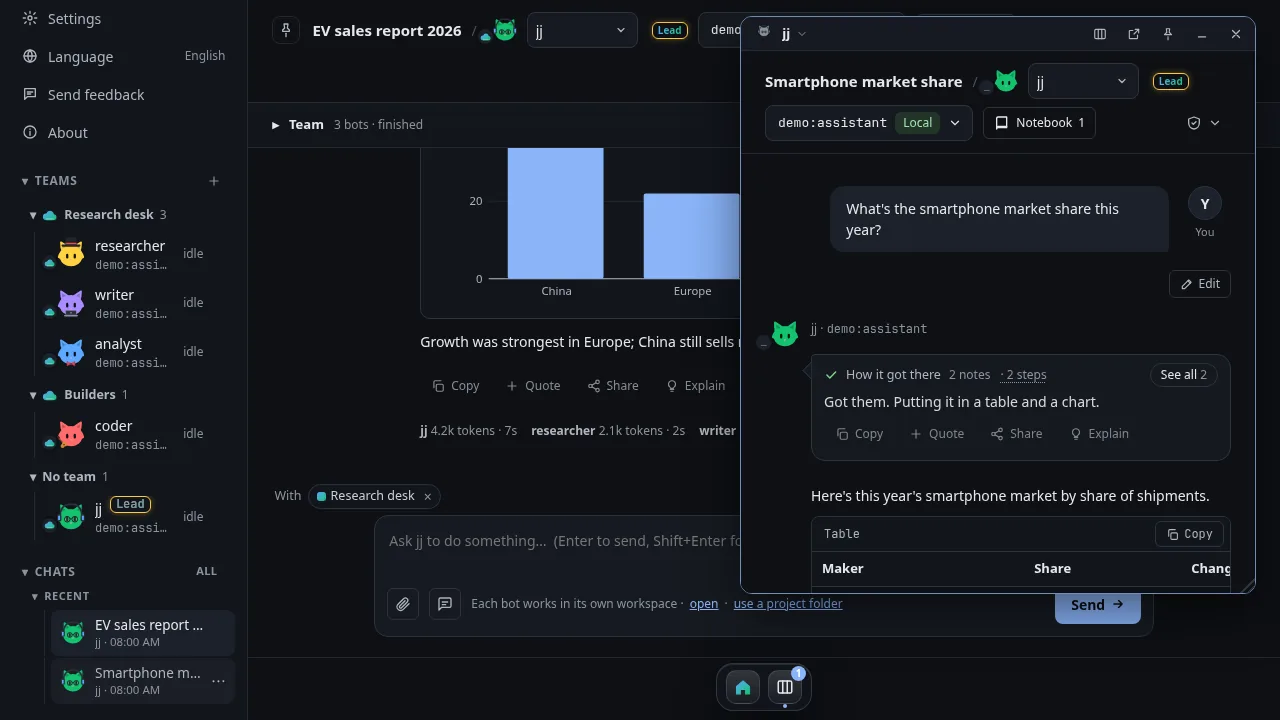
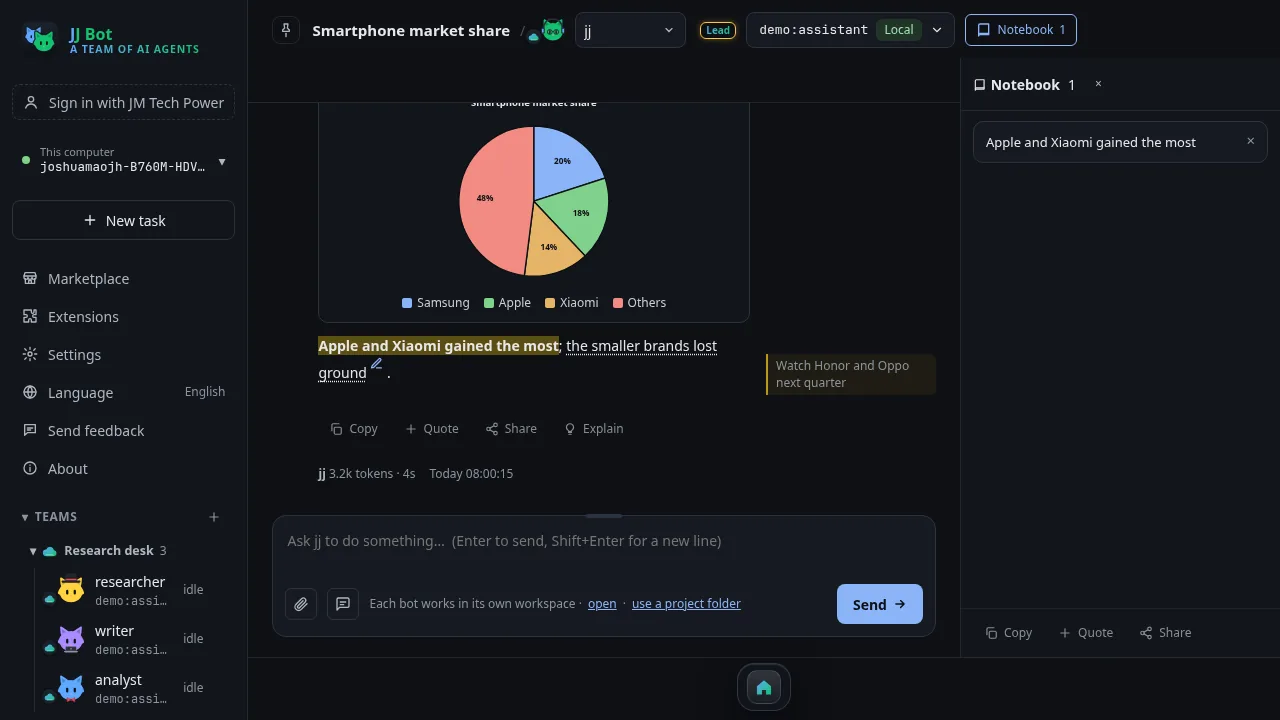
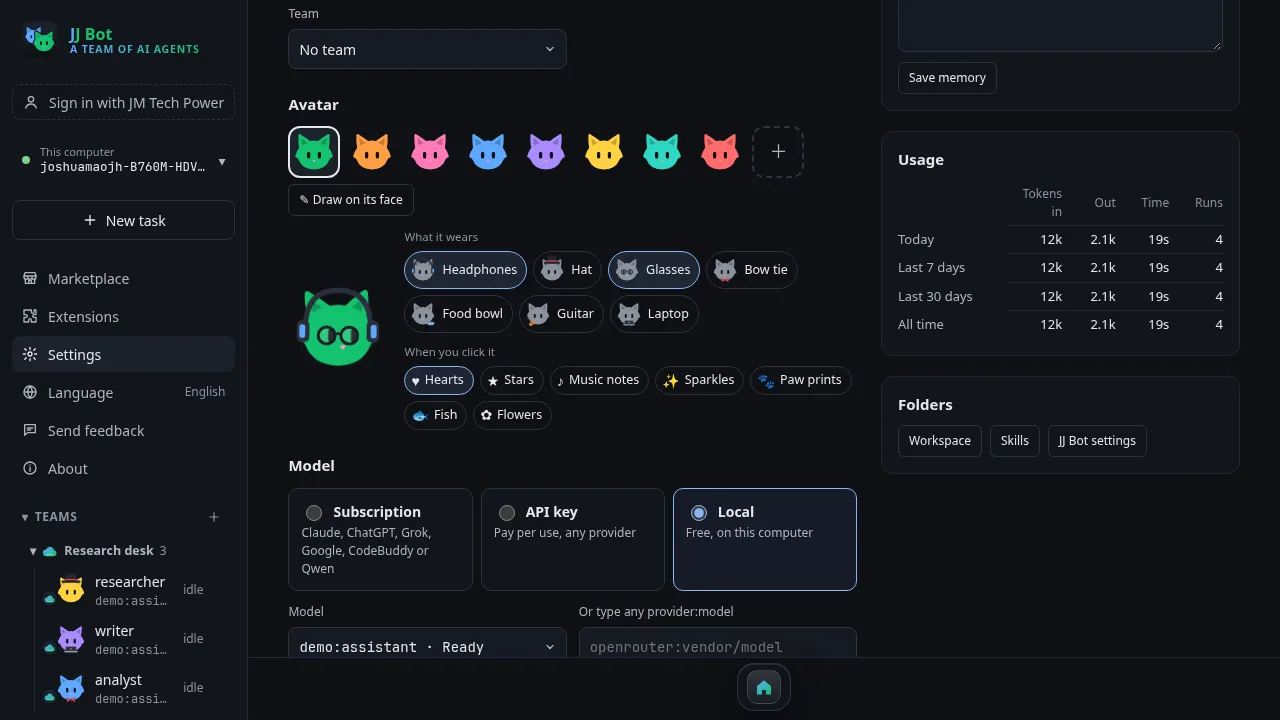
What it does
Any model
Claude, GPT, Grok, DeepSeek, Kimi, GLM, Qwen, OpenRouter, or free local models with Ollama. Pick a different one for each bot.
Your subscriptions
Already pay for Claude Pro, ChatGPT Plus, SuperGrok, a Google account or CodeBuddy / WorkBuddy? Bots can run on those instead of API keys.
Bots that work together
Bots hand work to each other, share a project folder, and can make new bots. A live board shows who's doing what.
You stay in charge
With Ask on, bots on Claude Code, API keys or local models wait for your OK before commands and file changes, apart from what you've allowed and notes to their own memory. Codex, Gemini CLI, Grok Build, Qwen Code and CodeBuddy can't stop to ask: each chat's shield says what they do instead.
From your phone
Chat and approve from your phone, with an alert when a bot needs you. Pair several computers and switch between them from the app or your phone.
Work around the clock
Routines run on a schedule, like a morning news summary, and keep a log you can read later.
Connectors
Plug in GitHub, Notion, Feishu / Lark, Stripe, Supabase, Airtable, Brave Search, a real browser or a folder of files. Paste a key and bots on Claude Code, Codex, Grok Build, CodeBuddy or an API model can use it.
Mac, Windows & Linux
One command installs it, and running it again updates it. JJ Bot then opens from your apps like any other.
@ a team or a bot
Type @ in a message to hand parts of a task to a team, one bot or several. They work at the same time and send their answers back.
Files right in the chat
When a bot makes a web page, picture, table or document, it shows in the answer. Pages run in a preview box you can click through.
Templates & Marketplace
Start from ready-made bots and teams, save your own, and share them or add ones other people made. JJ Bot's official skills come installed, and you can share your own skills, add skills from GitHub, and search thousands of open prompts from prompts.chat.
Your setup everywhere
Sign in with your JM Tech Power account and your bots, teams, prompts and skills sync to every computer. Keys and chats stay put.
8 languages
English, 简体中文, 繁體中文, Deutsch, Français, 日本語, 한국어 and हिन्दी.
How JJ Bot compares
Grok Bot, OpenAI Dots and Meta Muse are always-on agents that run on a computer in their maker's cloud. JJ Bot takes a different path: it runs on your own computer, with whichever models you choose.
| JJ Bot | Grok Bot (xAI) | OpenAI Dots | Meta Muse | |
|---|---|---|---|---|
| Models | Any. Claude, GPT, Grok, Gemini, DeepSeek, Kimi, Qwen, GLM, or free local models. A different one for each bot. | xAI's Grok models only | OpenAI's models only | Meta's models only |
| Where it runs | On your own Mac, Windows or Linux computer | A cloud computer from xAI | A cloud computer from OpenAI | A private cloud computer (Secure VM) from Meta |
| Your files and logins | Stay on your computer. Only what a bot sends to its model leaves it. | Kept on xAI's computer | Kept on OpenAI's computer | Kept on Meta's computer; real passwords hidden from the agent |
| Cost | Free app. Use subscriptions you already pay for, pay-per-use keys, or free local models. | Needs a paid xAI plan | ChatGPT Pro or Business plans | Meta account; launched in a few countries first |
| Several bots working together | Yes. Any bot can message any other, even when they run on different companies' models. Sort them into teams. | Several Bots per account | A Dot can hand work to helper agents | One personal agent |
| Asks before risky steps | On Claude Code, API keys and local models. Other AI tools can't all ask. Per bot: ask, allow everything, or read only. | Hands over to you for passwords, payments and similar steps | Configurable permissions and an automatic review of big actions | A second agent checks every outside action |
| Works in mainland China | Yes, with DeepSeek, Kimi, Qwen, GLM, CodeBuddy or local models | Not offered there | Not offered there | Not offered there |
| Keeps working when your computer is off | No. It needs your computer on (it keeps running in the background while the window is closed) | Yes | Yes | Yes |
| Setting it up | More steps. Install the app, then add a key, sign in to a subscription tool, or download a local model | Nothing to install | Built into ChatGPT | In Meta's apps, plus a Mac app |
Where JJ Bot is strongest
- Free, and not tied to one AI company: mix models, and switch any time
- Your files stay on your own computer
- Teams of bots that work together, across different models
- Works in mainland China, and offline with local models
Where it falls short
- Stops when your computer is off or asleep; there's no cloud computer
- Takes a few more steps to set up than a website
- How good a bot is depends on the model you pick; small local models are weaker
- A young project from a small team
Based on what each company and the press reported as of November 2026; their plans and countries change often. Sources: Grok Bot, OpenAI Dots, Meta Muse.
What you need
- A Mac, a Windows 10 or 11 PC, or a Linux computer, with Python 3.11 or newer. The installer finds it wherever it is, including Homebrew, the Windows
pylauncher and uv. - No Python yet? On Windows, the installer and the one-command install add Python 3.12 for you. On a Mac:
brew install python@3.12, or get it from python.org. - On Linux, the desktop window also needs GTK WebKit. On Ubuntu or Debian:
sudo apt install python3-venv python3-gi gir1.2-webkit2-4.1 - A model to use. JJ Bot's first chat walks you through Zhipu's free GLM-4.7-Flash, or use an API key, a subscription you already have, or Ollama for free local models.
Install by hand
- Download
jjbot.zipabove and unzip it. - In the
jjbotfolder, runbash install-desktop.sh(on Windows:powershell -ExecutionPolicy Bypass -File install-windows.ps1). JJ Bot appears in your apps: Applications on a Mac, the Start menu on Windows, the app menu on Linux. - Open JJ Bot: its first chat helps you connect a model. (In a terminal,
jjbot initdoes the same; on a Mac or Linux,.venv/bin/jjbot init.)
Just want the command line? pip install -e . in the folder, then jjbot init.
After installing
- The first chat helps you connect a model;
jjbot initdoes the same in a terminal. Settings live in~/.jjbot. - Open JJ Bot from your apps (on a Mac: Launchpad or Spotlight; on Windows: the Start menu), or chat in a terminal with
jjbot chat. - The full guide is
README.mdinside the download.
Remove it
On a Mac:
rm -rf ~/.local/share/jjbot ~/.local/bin/jjbot ~/Applications/"JJ Bot.app"
On Linux:
rm -rf ~/.local/share/jjbot ~/.local/bin/jjbot ~/.local/share/applications/jjbot.desktop
On Windows, in PowerShell (if you turned on jjbot remote install, run jjbot remote uninstall first):
Remove-Item -Recurse -Force "$env:LOCALAPPDATA\JJBot", "$env:APPDATA\Microsoft\Windows\Start Menu\Programs\JJ Bot.lnk"
This keeps your settings and chats. To remove those too, also delete ~/.jjbot.